
In this review, we will take a closer look at two of the most trendy 2026 face-search tools– face search engine and PimEyes.
Both claim to find the person’s photos wherever it appears online, but they work in varying ways, with different levels of algorithms, pricing, and user experiences.
Since both of them are designed to do the same, let’s explore which tool people would find better in 2026, and why.

Face Search Engine vs PimEye: Side-By-Side Comparison
Before diving into their working, features, pricing, algorithms, and user interaction, have a look at the quick comparison table:
Quick information
| Aspect | face search engine | PimEyes |
| Main Function | Face-matching & lookup (fast, consumer/utility focus) | Reverse-image face searches |
| Algorithm / Search Pipeline | Face detection → alignment → deep-CNN embedding → ANN index → similarity search → basic filters. Likely uses open-source or lightweight proprietary embeddings (e.g., FaceNet/ArcFace) with FAISS/HNSW for fast nearest-neighbour search. | Large-scale web crawler → frame extraction (for videos) → face detection/alignment → high-capacity CNN embeddings → distributed FAISS/HNSW → re-ranking + metadata scoring; supports video search. |
| Indexing Strategy | Targeted index optimised for speed and low-cost storage. Prefer periodic indexing rather than continuous crawl. | Updated index of public webpages and image hosts, designed for broad recall and scale. |
| Scoring & Re-ranking | Comparing their embeddings and using a cutoff to decide a match. It also checks the image quality. | Compares embeddings and then re-checks results using signals and metadata. |
| Privacy & Opt-out Handling | Claims minimal server-side retention, ephemeral embeddings per session. | provides opt-out/removal workflows but faces privacy scrutiny over indexing practices. |
| Performance Tradeoffs | Prioritizes low latency, ease of use, and lower infrastructure costs. | Prioritizes recall and coverage at scale; higher compute and storage cost, more complex infrastructure. |
We’ve compiled a detailed comparison of both tools to help you choose the right one. Let’s get started:
UI/UX Experience
face search engine features a simple and minimal interface, prioritizing simple core actions. Its homepage is easy to access and distraction-free, so that even a beginner can easily find people online.
Especially designed to work on all devices and stay responsive whether you use it on a phone, laptop, or tablet. In short, you can perform quick searches without errors at any time at no cost.
With a professional look, PimEyes offers a feature-rich interface. Its main search option is accessible for limited use until you pay for its premium subscription. You can use alerts, monitoring, and account-based controls options in this tool.
After signing up, the dashboard is organized to let users review their searches, track matches, and adjust privacy preferences. Its interface can feel overwhelming at first due to the number of options available. It is more efficient for people who want monitoring and detailed results.
Signup Process: Different Access Requirements
A face search engine does not require creating a user account for searching for similar face pictures. You can simply visit the site, upload an image, and click to search instantly.
Through this convenience and quick one-time lookups, people can use this flexible tool without filling in any personal details or verification steps.
However, it is organized for immediate responses and assistance to get what is required rather than user management.
PimEyes, on the other hand, requires users to sign up before utilizing certain features.. For instance, features such as detailed results, history, watchlist alerts, and privacy tools are only available after registration (or the purchase of their monthly plan). Whereas you can initiate a limited search without having an account. Users can sign up hassle-freely, but it includes standard verification steps, and accessing advanced features requires a paid plan.
How to Use – Step-by-Step
Face Search Engine
Open face search engine: https://facesearchengine.com/
You don’t even need to scroll. The upload box is placed right on the homepage for ease.
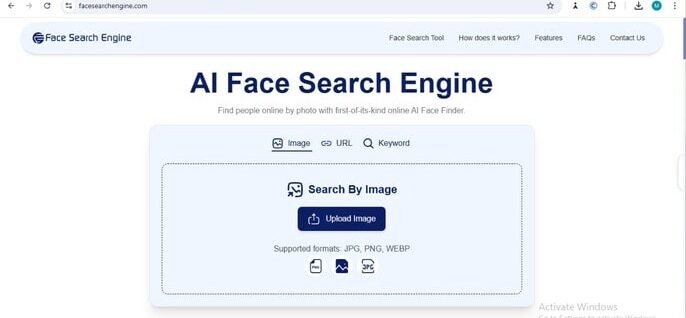
Provide Input: Then, click on the upload option and select the photo in JPG, PNG, or WEBP formats that you want to search. Interestingly, this engine also allows you to search by URL and keyword.
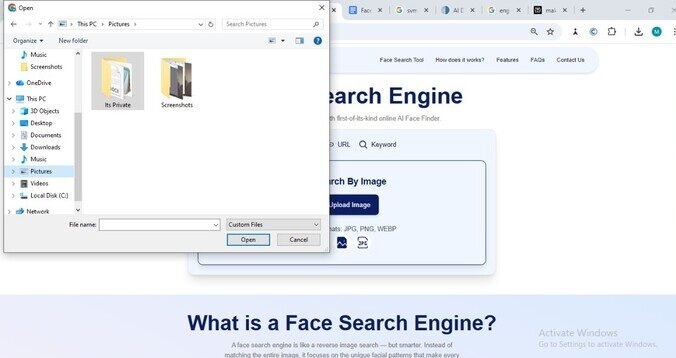
Wait for Processing: After picking, the system instantly begins processing it.

Display Output: It displays the closest matches of your given picture within a few seconds. No extra steps, menus, or settings need to be adjusted. These similar pictures are linked to their sources.

Privacy Concerns: It does not store the output for so long. One-click searching makes it ideal for quick checks or casual use.
PimEyes
Open Pimeyes: https://pimeyes.com/en
Upload Picture: PimEyes follows a bit more guided flow. When you upload an image or drop from somewhere else, it will show an error in case of low quality. You have to provide high-quality pictures, then edit them if needed.

System Process: The platform takes a few seconds to find similar faces.

Display Result: After completing the search, it redirects you to an output page that highlights possible matches from the database.
If you’re logged in, it allows you to further open full results, save searches, set alerts, or use additional filtering features.

Privacy Concerns: It stores the picture for more searches over time. But its opt-out feature lets you request to delete the picture permanently.
Mechanism Behind Working
face search engine
Face Search Engine operates through a streamlined process for matching. Some deep learning convolutional neural networks(CNNs) are used for this purpose, which are described here:
- HAAR-Cascades Algorithms: When you upload an image, paste the URL or share the keyword, this AI-trained algorithm detects the visible facial features. If the picture does not have a face, it will display this. If it is, then the request sis ent to the next algorithm.
- HOG Algorithms: The face alignment is performed with autoencoders to identify how the face is mapped into a latent space. HOG function extracts the face features (eyes, nose, chin, cheeks, forehead) and small details such as dark circles, birthmarks, age marks, or something else. These small details are converted into a geometrical order to compare.
- SVM Technology: Support Vector Machine is a supervised machine learning algorithm. It compares all facial features with the database pictures, including social media posts, web images, or all available online pictures, to locate visually similar faces. When it gets a similar face as the uploaded image has, with a similarity score of around 80% or more, it displays the result along with links to the original sources.
PimEyes
PimEyes works by making a facial blueprint of the photo users upload.
- Face Fingerprints: When an image is added, its system scans the face features and other measure points such as eye distance, jaw shape, and different proportions. They convert into a unique face fingerprint then.
- Machine learning: PimEyes algorithms are trained by ML technology. It finds the matching fingerprint against billions of images in the database. Private social media networks are not used in this process. When a similar facial structure is located, matching results with the source links pop up as the outcome. It stores only coded facial indexes, not the actual photos. After a few hours of the result, the uploaded image will be removed from the system if you are not a subscriber.
Quality and Output Comparison
Usually, the accuracy, consistency, and results are considered for comparing the output quality. Face Search Engine provides related matches as it uses real-time indexed data and detailed facial mapping.
It usually highlights only the faces that closely resemble the uploaded image. This tool precisely offers security-level identification with the similarity scores. Users can quickly verify the result quality with a clean layout of pictures.

PimEyes generates similar faces from its database. Particularly, its coverage is limited. It can only be helpful when the uploaded image is clear, front-facing, and high-resolution. However, the output depends on the image quality; if it is not sustainable, it may fail to show similar faces in the output.

Pricing Plans
According to the official website, face search engine describes a free tool. You can upload images in multiple formats ( JPG, PNG, WEBP), get unlimited searches, and your personal data won’t be saved for long. face search engine functionality is accessible without any payment – no paid or subscription plan is mentioned on the site.
Currently, PimEyes’ official subscriptions are available on their site with three main paid plans. These are briefly described here:
Open Plus
- Do 75 searches/day
- Access the source websites
- Alert system for new matches
- Can cancel anytime
PROtect
- Perform 100 searches/day
- More alerts
- Tools to remove unwanted images
- Option to hide your results from public searches
- Can cancel anytime
Advanced
- Unlimited daily searches
- Chance of 500 alerts
- Access to Deep Search
- Ability to export results (PDF/CSV)
- Helpful for investigators, journalists, and high-use professionals
- Can cancel anytime
Which One is the Most Trustworthy?
face search engine prioritizes user privacy and is more reliable. Customer share their experience and show their trust in reputed sources– rating, G2: 4.7/5, TrustPilot: 4.⅘.
According to PimEyes’ policy, uploaded photos are stored temporarily and deleted within about 48 hours for non-subscribers. Its opt-out option allows you to request to remove your face from their index.
Some users and privacy experts have concerns about how these “faceprints” can be indexed publicly and then re-identified, so it may not be fully trustworthy.
Face search engine is a fast, private, and advanced platform search without paying any cost. It can be a helpful asset for journalists, researchers, or anyone who wants to find images with full privacy protection.
Whereas pimEyes is better for users who prefer advanced features, such as access to result sources, alerts for new matches, and the ability to request image removal. But unfortunately, all of these features come with paid plans, and its database does not work on the latest platforms for searches.
So, Face Search Engine is a reliable, fast, and trustworthy option that you can use unlimitedly without paying anything.